
Jukeblocks alternative · audio to MIDI
Need a Jukeblocks alternative for one melody? Try a local MIDI pass.
Short answer: Local MIDI is an alternative when you want to turn one clear melodic line into editable MIDI without uploading the audio: it accepts WAV, MP3, M4A, OGG, and FLAC up to 20 MB and processes the file on your device. It is not a like-for-like replacement for Jukeblocks Recreate: Local MIDI does not separate full songs into instrument stems or transcribe polyphonic arrangements.
Choose by the job, not the brand
One exposed melody and local processing: try Local MIDI. MP3/WAV conversion with a larger published upload limit: Jukeblocks' converter lists up to 100 MB and five minutes. Full-song stems or separate instrument tracks: Jukeblocks Recreate is the closer fit; Local MIDI cannot do that job.
Quick comparison
The useful difference is the workflow you need
| Option | What its public page describes | Best fit | Limit to keep in view | Authority context |
|---|---|---|---|---|
| Jukeblocks Audio to MIDI | Upload MP3 or WAV and download Standard MIDI; its page says clear melodies work best and dense mixes may need DAW cleanup. | A familiar upload-and-convert flow, including files up to 100 MB or five minutes. | The public converter page does not publish a controlled accuracy score or detector frequency boundaries. | DR 18; one referring domain; estimated 11k monthly visits* |
| Jukeblocks Recreate | Promotes separating a song into parts such as bass, chords, and melody, with MIDI and other music-production outputs. | A full song or a multi-part arrangement where stems are the point. | That is a broader workflow than this small local melody converter; compare the current product and plan details before choosing. | Same Jukeblocks domain snapshot* |
| Local MIDI | Runs the selected file through a lightweight monophonic pitch detector in the browser and creates a MIDI draft; the file is not uploaded to Local MIDI. | One clean vocal, bass, lead, or other single-note line when keeping the source on-device matters. | Not a chord recognizer, stem separator, or full-song transcription tool. A known dual-tone test collapsed to one wrong note here. | No domain-rating figure cited |
| Spotify Basic Pitch | Its project describes pitch-bend detection and says it supports polyphonic instruments, while working best on one instrument at a time. | A model-based transcription baseline to try on an exposed instrument part. | It is not a promise of finished, perfectly edited MIDI; inspect the export against the source. | DR 95* |
*SEO authority context: Jukeblocks DR 18, one referring domain, and estimated 11k monthly visits; Spotify Basic Pitch DR 95. These figures came from the site owner's supplied competitor snapshot; its measurement date and vendor were not included, so they have not been independently verified. Domain Rating and estimated traffic are not product-quality or ranking guarantees.
These are product descriptions, not a head-to-head benchmark. We did not run the same source through Jukeblocks, Basic Pitch, and Local MIDI, so this page does not rank their accuracy.
What we can verify
Three concrete differences—not three unsupported promises
- On-device file handling. Local MIDI decodes the selected file with the browser's audio API and generates the MIDI in the page; it does not send the recording to our server. Jukeblocks' public converter presents an upload form that posts to its conversion endpoint. If offline processing is a deciding factor, use the workflow whose data path matches your needs.
- Five input extensions in the local tool. Local MIDI accepts WAV, MP3, M4A, OGG, and FLAC up to 20 MB. Jukeblocks' audio-to-MIDI converter page lists MP3 and WAV, up to 100 MB and five minutes. A larger upload cap may matter more than extra formats—choose accordingly.
- Published detector boundaries and a repeatable failure case. Our converter code searches 55–1,400 Hz, gates output to MIDI notes 28–96, and uses a 120 BPM / 480 PPQ MIDI timeline. The test below exposes a real polyphonic failure instead of hiding it behind an accuracy percentage. Jukeblocks may have internal diagnostics, but those specific settings and this same test are not published on its public converter page.
Measured on Local MIDI
A two-tone input reveals the monophonic boundary
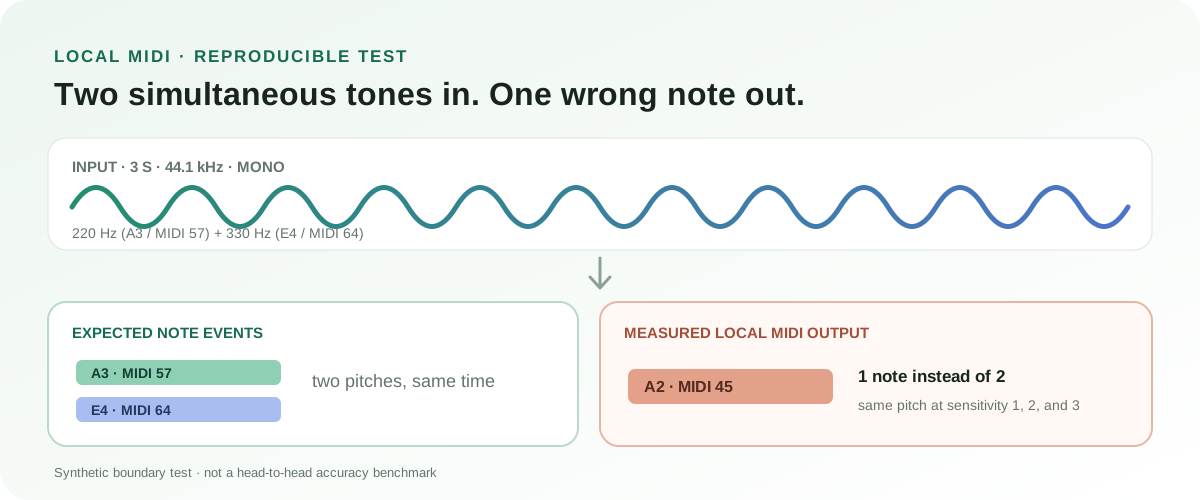
Input: a generated 3-second, 44.1 kHz mono signal containing simultaneous 220 Hz and 330 Hz sine waves, each at 0.04 amplitude with short fades. Those tones correspond approximately to MIDI 57 (A3) and MIDI 64 (E4), so the expected draft contains two simultaneous notes.
Observed output: the local detector emitted one MIDI 45 (A2) event, not the two expected notes. Re-running the same detector logic at sensitivity levels 1, 2, and 3 still produced one pitch-45 event; only the start/end boundary shifted slightly. That is a measured failure on this synthetic chord, not a universal accuracy percentage and not a competitor comparison.
The result is useful precisely because it is specific: if your job is chords, do not choose Local MIDI as a polyphonic alternative. Use a workflow that exposes separate parts, then inspect missing notes, false notes, timing, and sustains in your DAW.
See the detector's other measured boundariesDecision
So, is Local MIDI a Jukeblocks alternative?
Yes, for a narrow use case: a clean, single-note recording, a small file, and a preference for on-device processing. Start with the free local converter, then check the note events in your DAW.
No, if by “alternative” you mean equivalent full-song transcription. Local MIDI does not separate vocals, bass, chords, and melody from a mix. Jukeblocks Recreate publicly offers a separate multi-part workflow; a monophonic browser converter should not be presented as a substitute for it.
For a wider set of choices, compare our audio-to-MIDI workflow guide and polyphonic workflow notes. We have not measured a common-song accuracy score for any of these tools.
FAQ
Jukeblocks alternative questions
Is Local MIDI more accurate than Jukeblocks?
We do not know from a fair comparison: we have not run the same set of recordings through both tools. The dual-tone example on this page is a Local MIDI boundary test only, not a relative accuracy score.
Can Local MIDI replace Jukeblocks Recreate for a full song?
No. Local MIDI is a lightweight monophonic estimator. It does not separate a full mix into instrument stems or create a multi-part arrangement.
Does Jukeblocks publish its accuracy score?
Its public audio-to-MIDI converter page describes clear melodies as the best input and warns that dense mixes may need cleanup. We did not find a controlled accuracy score or detector boundary settings on that page when checked on October 23, 2026.
Sources checked
Product claims linked to their public pages
- Jukeblocks Audio to MIDI Converter — supported upload formats, stated file limits, and product copy.
- Jukeblocks Recreate — public description of its song-to-parts workflow.
- Spotify Basic Pitch project — pitch-bend and polyphonic support notes.
- Local MIDI's measured converter boundaries — reproducible observations on the local detector.
Competitor product descriptions were checked October 23, 2026. Features can change; the vendor pages are the source of truth for current limits and plans.