
Polyphonic audio to MIDI
For chords, expect an editable first draft—not a clean MIDI track.
If your audio contains overlapping notes, there is no honest one-click promise of accurate MIDI. Compare Melodyne and Prism on the same short passage, then choose the result that takes less correction in your own DAW.
The short answer
Choose by correction workload, not by a perfect-conversion claim
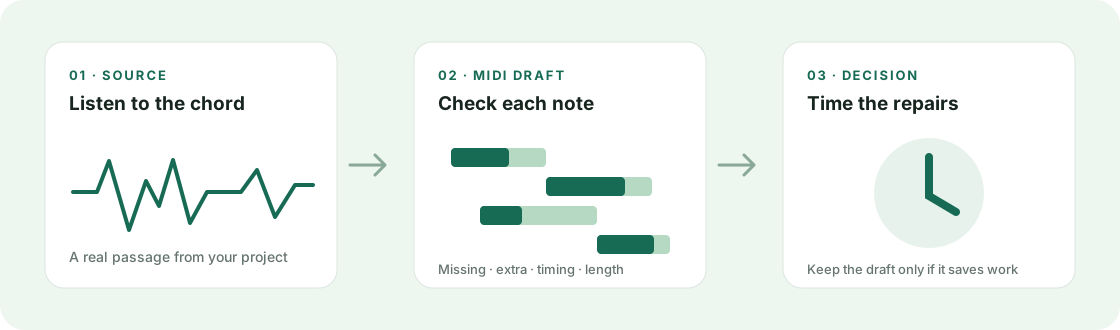
For a chord, the useful question is not simply “Did it make MIDI?” Ask whether the exported notes preserve the chord tones, note starts, and note lengths well enough that editing is faster than entering the part again.
Melodyne and Prism are worth evaluating as candidate workflows, but the name alone cannot predict your result. Instrument, arrangement density, tuning, effects, and the passage you choose all change what needs repair. We have not run a controlled head-to-head test, so this guide does not claim a winner or publish accuracy percentages.
Melodyne vs Prism
A fair comparison you can run on your own material
| Check | Melodyne | Prism |
|---|---|---|
| What to test | Can you identify and edit the notes in the chosen chord passage? | Can you identify and edit the notes in the exact same passage? |
| Listen for | Missing chord tones, false notes, note starts, and sustained-note splits. | Missing chord tones, false notes, note starts, and sustained-note splits. |
| Measure | Minutes spent correcting before the MIDI is usable in your DAW. | Minutes spent correcting before the MIDI is usable in your DAW. |
| Decide | Keep it if the editable result saves time on your source. | Keep it if the editable result saves time on your source. |
Pricing, trial duration, file limits, and export options can change. Check each product’s current plan before paying; this page does not treat a remembered price or an unverified free-preview limit as current fact.
A repeatable 10-minute test
Use one passage and count the repairs
- Pick a 15–30 second section with a chord or overlapping notes that matters in your project. Keep the original file unchanged.
- Use the same source, section, and DAW workflow in both products. Do not compare different songs or different edits.
- Export each MIDI draft. In your DAW, check one short region for missing notes, extra notes, wrong note starts, and wrong note lengths.
- Time the correction pass. If repairing the draft takes as long as entering the part by hand, that result did not save time for this source.
- Repeat on a second passage before buying. One easy chord is not evidence that dense music will behave the same way.
Keep the comparison honest: this is a buyer’s test protocol, not a claim that either product passed it. Your notes and correction time are the evidence.
When a full mix breaks down
Separate the part before asking for its notes
When drums, bass, chords, and lead overlap, a converter has to infer which pitches belong to which source. A useful next step is to isolate the instrument or stem you actually need, then transcribe that cleaner input and review it by ear.
Stem separation is not a guarantee: artifacts can create false note attacks or erase quiet tones. Compare the separated audio with the original before trusting the MIDI.
Try the local monophonic audio-to-MIDI converterFAQ
Polyphonic audio to MIDI questions
Can a converter turn any chord or full song into accurate MIDI?
No universal accuracy guarantee is realistic. Overlapping instruments, dense chords, effects, and quiet notes make the task harder. Evaluate a draft against your own source and count the repairs.
Is Melodyne or Prism more accurate?
This site has not run a controlled comparison, so we cannot name a measured winner. Use the same source passage in both, export MIDI, and compare missing notes, extra notes, timing, and correction time.
Should I pay based on a short preview?
Only after checking what the current trial actually allows: usable audio duration, export availability, and whether MIDI export is included. Verify those terms directly before purchase.