
Convert a WAV melody to an editable MIDI draft.
Yes. Choose a WAV up to 20 MB and Local MIDI decodes and analyzes it in your browser. The result is note data for a clear single melodic line, not the original recording, a separated stem, or a finished arrangement.
WAV avoids MP3's lossy encoding step, but it does not make pitch detection accurate by itself. A chordal mix, noisy take, quiet note, or strong vibrato can still produce missing, split, or incorrect events.
The selected audio is decoded in your browser; it is not uploaded to a server.
WAV vs. MP3
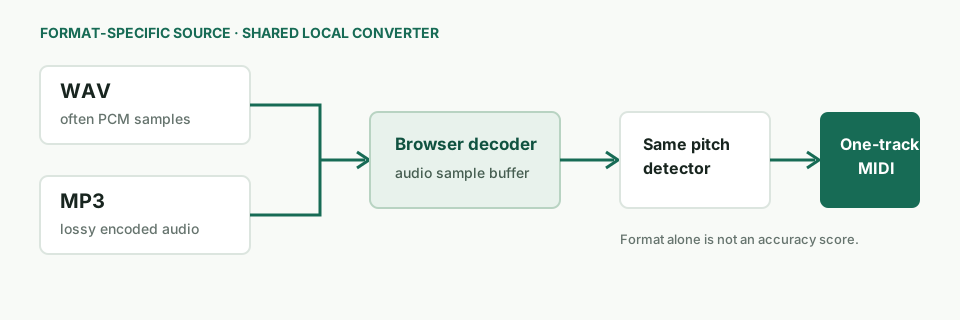
The file format changes the source path, not the note detector.
WAV is commonly uncompressed PCM, while MP3 is lossy. If both files come from the same master, WAV avoids MP3 encoding artifacts; it cannot restore detail already missing from a recording, remove room noise, or separate instruments. Local MIDI sends both formats through the browser audio decoder and then the same pitch-detection and MIDI-writing code.
| What differs | WAV input | MP3 input |
|---|---|---|
| Before decoding | Often PCM samples without lossy perceptual encoding. | Lossy encoding may discard or soften source detail. |
| Browser step | Browser decodes the selected file into audio samples. | Browser decodes the selected file into audio samples. |
| Detector in Local MIDI | Same detector. It reads the first decoded channel, searches fundamentals from 55 to 1,400 Hz, and writes a one-track MIDI draft at 120 BPM / 480 ticks per quarter note. | |
| What format alone tells you | Nothing about note-level correctness. Event count is output volume, not correct-note count or accuracy. | |
For a format-specific MP3 entry point and its compression caveats, see the MP3-to-MIDI page. This page is for people starting with a WAV file; the general audio-to-MIDI guide addresses choosing a workflow across source types.
Current implementation
What this WAV converter reads and writes.
It reads one channel and follows one pitch at a time
The current browser code decodes the selected file, then analyzes channel zero rather than splitting stereo channels into separate tracks. Its pitch search is bounded to 55–1,400 Hz and the exported MIDI pitch range is 28–96. Adjacent frames within one semitone can be grouped into an event. These are implementation limits read from the current converter code, not measured accuracy claims.
The MIDI is a fixed-tempo note draft
Local MIDI writes note-on and note-off events to a standard one-track MIDI file using a 120 BPM basis and 480 ticks per quarter note. It does not copy the WAV waveform, tempo map, instrument tone, stereo image, or arrangement. Import the MIDI beside the WAV in a DAW and check pitch, note starts, note ends, and octave before using it.
A sensible first pass
- Start with one isolated part. A solo vocal, hummed line, bass, or single-note instrument gives the pitch tracker less overlap to interpret.
- Keep the source under 20 MB. The browser decodes the file locally; a larger file is rejected by the shared converter.
- Inspect the downloaded notes. The status reports how many events were emitted, not how many source notes were correct. Compare the MIDI with the WAV in your DAW.
Evidence boundary. The frequency range, channel selection, MIDI pitch bounds, tempo basis, and tick resolution above are read from the shipped converter.js. This page has not independently measured note precision or recall on WAV recordings, so it makes no such claim.
Related formats
Start from a different kind of audio?
Convert an MP3 to a MIDI draft for the compressed-file workflow and its channel checks.
Choose an audio-to-MIDI workflow when you are comparing source types and tools rather than looking for the WAV upload path.
FAQ
WAV to MIDI questions
Is WAV better than MP3 for MIDI conversion?
WAV can preserve source detail that lossy MP3 encoding may discard, but neither format guarantees accurate notes. The recording, instrument overlap, noise, and detector matter too.
Does the WAV upload to a server?
No. The selected file is decoded and analyzed in your browser and is not uploaded by this converter.
Can it turn a WAV song into separate MIDI instrument tracks?
No. The current converter creates one MIDI track from a monophonic pitch estimate. It does not separate stems or recover a full arrangement.
Does the event count show how many notes are correct?
No. It is only the number of MIDI note events emitted. Correctness requires comparing the result against a note-level reference or inspecting it against the source.