
Real-time voice to MIDI
To play an instrument with your voice live, use a voice-to-MIDI controller—not an audio-file converter.
A real-time controller listens to a microphone and sends live MIDI into a DAW instrument. An audio-to-MIDI converter analyzes a recording you already made. Choose the first for spontaneous performance; choose the second when you want to transcribe and edit a take.
Start with the job
Live controller or recorded-audio conversion?
| Your goal | Workflow to look for | What you receive |
|---|---|---|
| Play a synth or bass while singing | Real-time voice-to-MIDI controller | Live MIDI notes that trigger an instrument as you vocalize. |
| Capture a melody from a voice memo | Offline voice-to-MIDI converter | A MIDI draft made from an existing recording, ready to inspect and edit. |
| Turn beatboxing into drum hits | Controller with percussive recognition or trained triggers | MIDI triggers or samples; this is not the same as transcribing a full drum recording. |
| Create chords from a sung root | Controller with chord generation | Generated chord events based on a rule or preset, not a transcription of several sung notes. |
Local MIDI's voice-to-MIDI converter is for a clear recorded melody. It does not track a live microphone as a MIDI controller.
Signal path
Four stages from vocal idea to playable sound
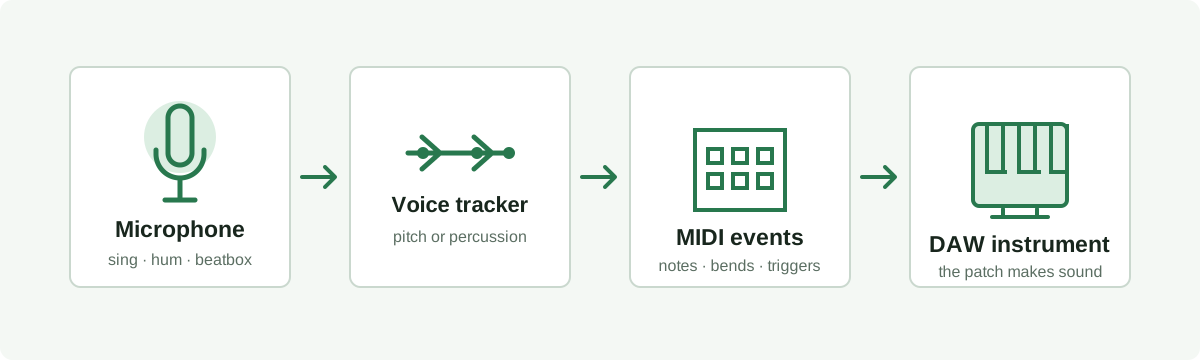
- Microphone: sing or hum a clear pitch, or make a percussive sound if the software supports drum triggering. Use the input device selected by the controller.
- Recognition: pitch tracking estimates a note; a percussive mode maps trained vocal sounds to triggers. These are different recognition jobs, so confirm the mode matches your input.
- MIDI routing: send the controller's MIDI output to an armed MIDI track or its capture function. Select the intended input port and channel if the software exposes them.
- Instrument: load the bass, guitar, synth, or drum instrument in the DAW. MIDI carries note and control events; the instrument makes the audio sound.
Latency matters live. Audio buffer size, the controller, and the DAW all affect how immediate the response feels. A vendor page describes its own product as low latency and offers a MIDI-capture cleanup feature; those are vendor claims, not measurements by Local MIDI. Test the response in your own audio setup before relying on it for performance.
Fit and limits
Match the controller mode to what you vocalize
Melody or bassline: sing one note at a time and let a pitch tracker drive a monophonic instrument. Check octave, note starts, and pitch bends in the recorded MIDI.
Chord backing: some controllers can generate chords from a root note. That can speed up sketching, but generated voicings are not evidence that the system transcribed a polyphonic vocal performance.
Beatbox rhythm: a percussive recognizer may map distinct vocal sounds to drum samples. Check that similar syllables do not trigger the wrong drum, and record the output before editing the timing.
Expressive pitch: look for explicit pitch-bend behavior and MIDI capture if you need to preserve slides or clean ghost notes. Do not assume every voice controller exports bends the same way.
No real-time tracking, latency, or accuracy tests were run for this article. Feature descriptions below are attributed to the cited vendor page and should be verified against the product version and your DAW.
Common questions
What to check before choosing a live voice controller
Can I convert audio to MIDI in real time?
Yes, with software designed to track live microphone input and emit MIDI while you perform. A normal upload-and-convert page processes a file after it is recorded and is not a live MIDI controller.
Can a plugin turn my voice into any instrument?
A voice controller can send MIDI to compatible software instruments, so the DAW patch supplies the instrument sound. That does not make the voice itself sound like a guitar or guarantee realistic picking, articulation, or polyphonic performance.
Can I record the result and edit it later?
Usually the MIDI must be recorded on a DAW track or captured by a controller's recording feature. Confirm that the output can be exported or dragged into the DAW, then inspect note timing, octave, bends, and unwanted triggers.
Source checked October 20, 2026: Vochlea Dubler 2 product page describes real-time pitch tracking, percussive recognition, pitch bend, MIDI capture, and DAW compatibility. This page summarizes the category and the vendor's published claims; Local MIDI has not independently tested that product.